> ## Documentation Index
> Fetch the complete documentation index at: https://docs-staging-fix-xaa-resource-app-isv-updates.mintlify.site/llms.txt
> Use this file to discover all available pages before exploring further.

> Learn how to configure a progressive profile form using Forms for Actions

# Use Cases: Configure a progressive profile form using Forms

<Card title="Before you start">
  1. Create a [Machine-to-Machine Application](/docs/get-started/auth0-overview/create-applications/machine-to-machine-apps) with the following scopes enabled:

  * `read:users`
  * `update:users`
  * `create:users`
  * `read:users_app_metadata`
  * `update:users_app_metadata`
  * `create:users_app_metadata`

  2. Add a [Vault connection](/docs/customize/forms/vault) using the M2M application credentials.
</Card>

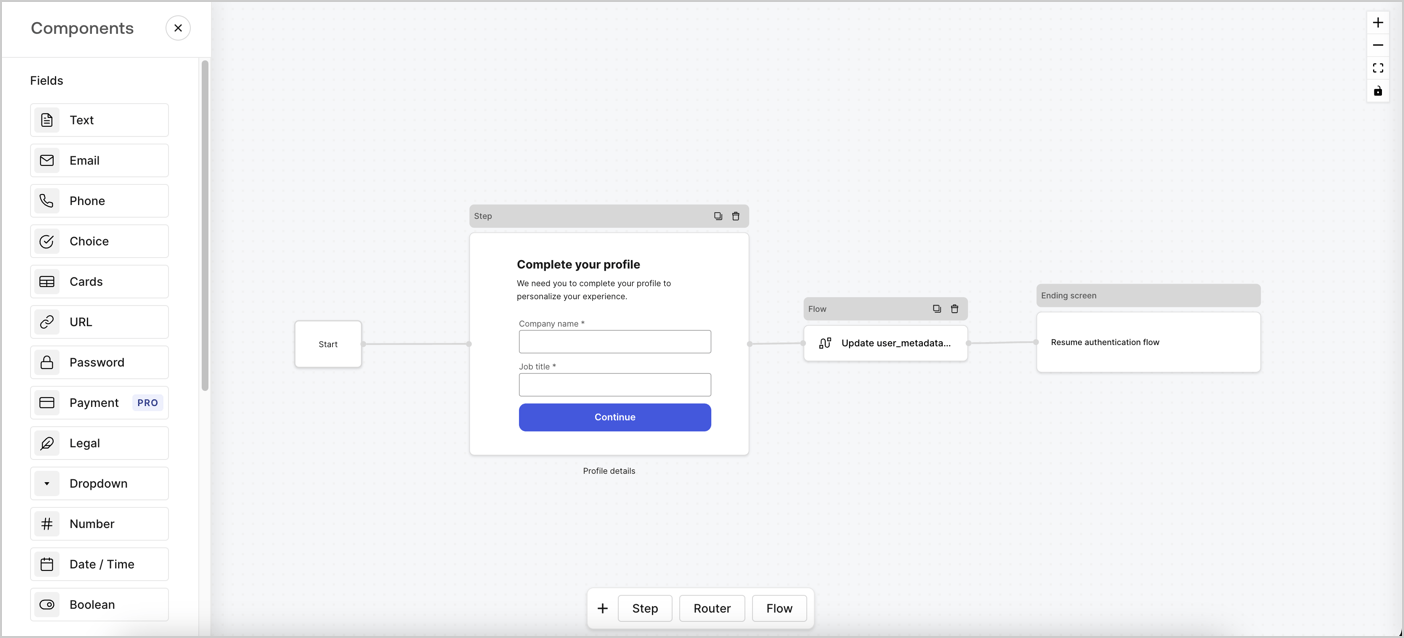
Forms for Actions allows you to create progressive profiling flows to decide when to prompt users to collect missing information, such as company name and job title, and store them as `user_metadata` attributes.
<Frame>
  <img src="https://mintcdn.com/docs-staging-fix-xaa-resource-app-isv-updates/lT-1tJVn5GRQykJY/docs/images/cdy7uua7fh8z/xUx9YmnHvnAqL19JvNtNP/60dae88f893d4ebe8e3523421e960596/Progressive-profle-overview.png?fit=max&auto=format&n=lT-1tJVn5GRQykJY&q=85&s=4a8b911eb0da2bb9a82a736afbec3bce" alt="Dashboard > Actions > Forms > Form" data-og-width="1404" width="1404" data-og-height="638" height="638" data-path="docs/images/cdy7uua7fh8z/xUx9YmnHvnAqL19JvNtNP/60dae88f893d4ebe8e3523421e960596/Progressive-profle-overview.png" data-optimize="true" data-opv="3" srcset="https://mintcdn.com/docs-staging-fix-xaa-resource-app-isv-updates/lT-1tJVn5GRQykJY/docs/images/cdy7uua7fh8z/xUx9YmnHvnAqL19JvNtNP/60dae88f893d4ebe8e3523421e960596/Progressive-profle-overview.png?w=280&fit=max&auto=format&n=lT-1tJVn5GRQykJY&q=85&s=d4d00427456a60bd7434f08ade88fb5a 280w, https://mintcdn.com/docs-staging-fix-xaa-resource-app-isv-updates/lT-1tJVn5GRQykJY/docs/images/cdy7uua7fh8z/xUx9YmnHvnAqL19JvNtNP/60dae88f893d4ebe8e3523421e960596/Progressive-profle-overview.png?w=560&fit=max&auto=format&n=lT-1tJVn5GRQykJY&q=85&s=b4e9023d1075e1dbd807d832a6fc37f7 560w, https://mintcdn.com/docs-staging-fix-xaa-resource-app-isv-updates/lT-1tJVn5GRQykJY/docs/images/cdy7uua7fh8z/xUx9YmnHvnAqL19JvNtNP/60dae88f893d4ebe8e3523421e960596/Progressive-profle-overview.png?w=840&fit=max&auto=format&n=lT-1tJVn5GRQykJY&q=85&s=0f65981771cf5f0ea7122c03f502b710 840w, https://mintcdn.com/docs-staging-fix-xaa-resource-app-isv-updates/lT-1tJVn5GRQykJY/docs/images/cdy7uua7fh8z/xUx9YmnHvnAqL19JvNtNP/60dae88f893d4ebe8e3523421e960596/Progressive-profle-overview.png?w=1100&fit=max&auto=format&n=lT-1tJVn5GRQykJY&q=85&s=6016f773e32411043e82890a49261596 1100w, https://mintcdn.com/docs-staging-fix-xaa-resource-app-isv-updates/lT-1tJVn5GRQykJY/docs/images/cdy7uua7fh8z/xUx9YmnHvnAqL19JvNtNP/60dae88f893d4ebe8e3523421e960596/Progressive-profle-overview.png?w=1650&fit=max&auto=format&n=lT-1tJVn5GRQykJY&q=85&s=e82b18f6bf73314a3efe9951320a5836 1650w, https://mintcdn.com/docs-staging-fix-xaa-resource-app-isv-updates/lT-1tJVn5GRQykJY/docs/images/cdy7uua7fh8z/xUx9YmnHvnAqL19JvNtNP/60dae88f893d4ebe8e3523421e960596/Progressive-profle-overview.png?w=2500&fit=max&auto=format&n=lT-1tJVn5GRQykJY&q=85&s=a413dad2e78037e1c53945f7253ff599 2500w" />
</Frame>

The sections below outline how you can create a progressive profile form using nodes and flows, along with steps for adding your form to a [Post Login Action](/docs/customize/actions/explore-triggers/signup-and-login-triggers/login-trigger).

## Create a form from scratch

Follow these steps to create a form to gather information:

1. Open the Form editor by selecting **Auth0 Dashboard > Actions > Forms.**
2. Select **Create Form** > **Start from scratch**.

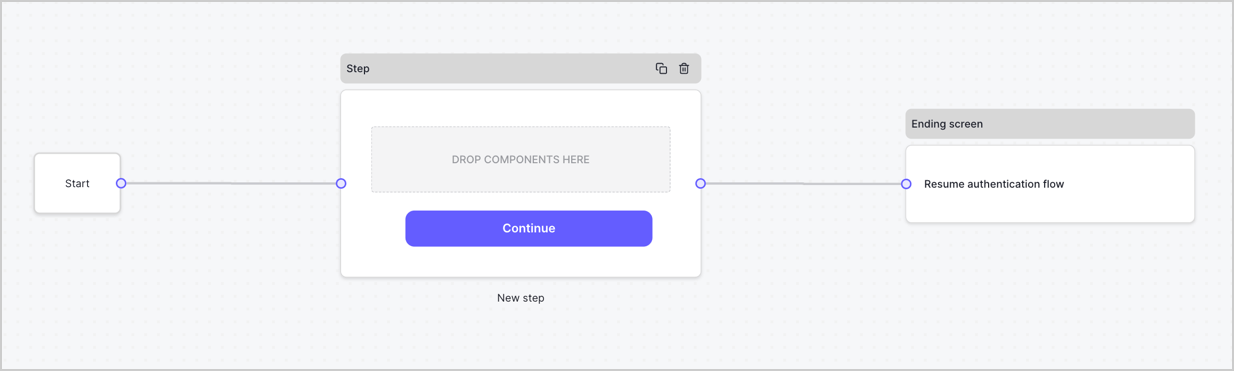
By default, a new form contains a Start node, a Step node, and an Ending screen node.
<Frame>
  <img src="https://mintcdn.com/docs-staging-fix-xaa-resource-app-isv-updates/ssy8lRhqwx6QOzKf/docs/images/cdy7uua7fh8z/2TZ9jSjgEcARFpULI6hz4R/a4319a1bd482f2ee5cc23100fdb2f42c/New-form-Forms-for-action-use-case.png?fit=max&auto=format&n=ssy8lRhqwx6QOzKf&q=85&s=538946d48bea054ada44ca2a3f80c8db" alt="Dashboard > Forms > Use Cases > Form" data-og-width="1234" width="1234" data-og-height="371" height="371" data-path="docs/images/cdy7uua7fh8z/2TZ9jSjgEcARFpULI6hz4R/a4319a1bd482f2ee5cc23100fdb2f42c/New-form-Forms-for-action-use-case.png" data-optimize="true" data-opv="3" srcset="https://mintcdn.com/docs-staging-fix-xaa-resource-app-isv-updates/ssy8lRhqwx6QOzKf/docs/images/cdy7uua7fh8z/2TZ9jSjgEcARFpULI6hz4R/a4319a1bd482f2ee5cc23100fdb2f42c/New-form-Forms-for-action-use-case.png?w=280&fit=max&auto=format&n=ssy8lRhqwx6QOzKf&q=85&s=d785d8478e996c8493244c4bd118a6d2 280w, https://mintcdn.com/docs-staging-fix-xaa-resource-app-isv-updates/ssy8lRhqwx6QOzKf/docs/images/cdy7uua7fh8z/2TZ9jSjgEcARFpULI6hz4R/a4319a1bd482f2ee5cc23100fdb2f42c/New-form-Forms-for-action-use-case.png?w=560&fit=max&auto=format&n=ssy8lRhqwx6QOzKf&q=85&s=31db9af9488fa3d50ba53297420c2782 560w, https://mintcdn.com/docs-staging-fix-xaa-resource-app-isv-updates/ssy8lRhqwx6QOzKf/docs/images/cdy7uua7fh8z/2TZ9jSjgEcARFpULI6hz4R/a4319a1bd482f2ee5cc23100fdb2f42c/New-form-Forms-for-action-use-case.png?w=840&fit=max&auto=format&n=ssy8lRhqwx6QOzKf&q=85&s=b3dd57ce8601a67fa7b960751da6577b 840w, https://mintcdn.com/docs-staging-fix-xaa-resource-app-isv-updates/ssy8lRhqwx6QOzKf/docs/images/cdy7uua7fh8z/2TZ9jSjgEcARFpULI6hz4R/a4319a1bd482f2ee5cc23100fdb2f42c/New-form-Forms-for-action-use-case.png?w=1100&fit=max&auto=format&n=ssy8lRhqwx6QOzKf&q=85&s=6c8144f9ba4f30d902af75659a8223f5 1100w, https://mintcdn.com/docs-staging-fix-xaa-resource-app-isv-updates/ssy8lRhqwx6QOzKf/docs/images/cdy7uua7fh8z/2TZ9jSjgEcARFpULI6hz4R/a4319a1bd482f2ee5cc23100fdb2f42c/New-form-Forms-for-action-use-case.png?w=1650&fit=max&auto=format&n=ssy8lRhqwx6QOzKf&q=85&s=05b932223a3e2714d89f02e72f9f5ddc 1650w, https://mintcdn.com/docs-staging-fix-xaa-resource-app-isv-updates/ssy8lRhqwx6QOzKf/docs/images/cdy7uua7fh8z/2TZ9jSjgEcARFpULI6hz4R/a4319a1bd482f2ee5cc23100fdb2f42c/New-form-Forms-for-action-use-case.png?w=2500&fit=max&auto=format&n=ssy8lRhqwx6QOzKf&q=85&s=09024dc8bec370fa9adc6265a2f30ba8 2500w" />
</Frame>

### Configure the Step node

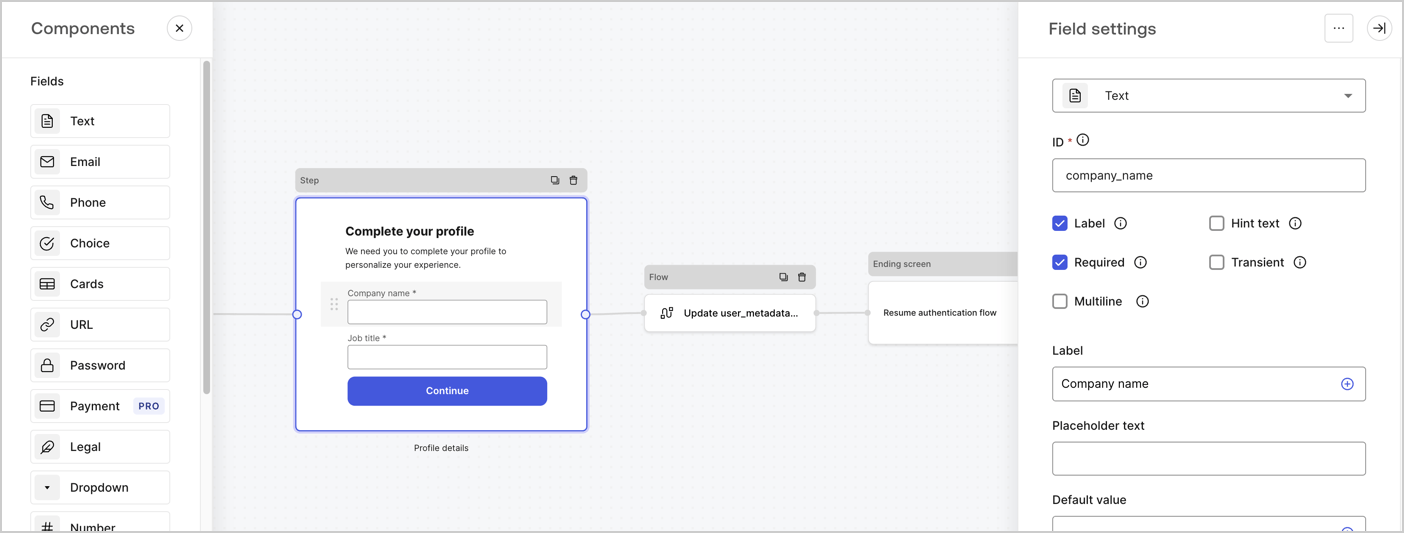
The Step node is the graphical interface visible to users. Add [Fields](/docs/customize/forms/nodes-and-components) to the Step node to collect the user's company name and job title values by following these steps:

1. Drag a **Rich text** field from the **Components menu** into the **Step** node.

   * **Rich text**: Enter a custom message.

     * **Example**: `Complete your profile! We need you to complete your profile to personalize your experience.`
   * Select **Save**.
2. Drag a **Text** field into the **Step** node.

   * **ID**: Enter `company_name`.
   * **Label**: Enable the checkbox.
   * **Label**: Enter `Company name`.
   * **Required**: Enable the checkbox.
   * Select **Save**.
3. Drag a **Text** field into the **Step** node.

   1. **ID**: Enter `job_title`.
   2. **Label**: Enter `Job title`.
   3. **Label**: Enable the checkbox.
   4. **Required**: Enable the checkbox.
   5. Select **Save**.
4. Select **Publish** to save.
<Frame>
  <img src="https://mintcdn.com/docs-staging-fix-xaa-resource-app-isv-updates/GKGPICkIZmWwzPea/docs/images/cdy7uua7fh8z/6H1lRzwKyYioQyQJ9MtIoM/aa248e92fc028a68a5b92ff361a11644/progressive-profile-step.png?fit=max&auto=format&n=GKGPICkIZmWwzPea&q=85&s=69bf4260d34dccf7144d18aa35e43b99" alt="Dashboard > Actions > Forms > Form > Step node" data-og-width="1404" width="1404" data-og-height="533" height="533" data-path="docs/images/cdy7uua7fh8z/6H1lRzwKyYioQyQJ9MtIoM/aa248e92fc028a68a5b92ff361a11644/progressive-profile-step.png" data-optimize="true" data-opv="3" srcset="https://mintcdn.com/docs-staging-fix-xaa-resource-app-isv-updates/GKGPICkIZmWwzPea/docs/images/cdy7uua7fh8z/6H1lRzwKyYioQyQJ9MtIoM/aa248e92fc028a68a5b92ff361a11644/progressive-profile-step.png?w=280&fit=max&auto=format&n=GKGPICkIZmWwzPea&q=85&s=ff11cfff608d6b418510335d096c4b58 280w, https://mintcdn.com/docs-staging-fix-xaa-resource-app-isv-updates/GKGPICkIZmWwzPea/docs/images/cdy7uua7fh8z/6H1lRzwKyYioQyQJ9MtIoM/aa248e92fc028a68a5b92ff361a11644/progressive-profile-step.png?w=560&fit=max&auto=format&n=GKGPICkIZmWwzPea&q=85&s=01f8eaca97a6bca64a423020d79acf73 560w, https://mintcdn.com/docs-staging-fix-xaa-resource-app-isv-updates/GKGPICkIZmWwzPea/docs/images/cdy7uua7fh8z/6H1lRzwKyYioQyQJ9MtIoM/aa248e92fc028a68a5b92ff361a11644/progressive-profile-step.png?w=840&fit=max&auto=format&n=GKGPICkIZmWwzPea&q=85&s=40ad9ec8049083b3038fa48cfc65db04 840w, https://mintcdn.com/docs-staging-fix-xaa-resource-app-isv-updates/GKGPICkIZmWwzPea/docs/images/cdy7uua7fh8z/6H1lRzwKyYioQyQJ9MtIoM/aa248e92fc028a68a5b92ff361a11644/progressive-profile-step.png?w=1100&fit=max&auto=format&n=GKGPICkIZmWwzPea&q=85&s=e7047a073346c98587422822bcb47b78 1100w, https://mintcdn.com/docs-staging-fix-xaa-resource-app-isv-updates/GKGPICkIZmWwzPea/docs/images/cdy7uua7fh8z/6H1lRzwKyYioQyQJ9MtIoM/aa248e92fc028a68a5b92ff361a11644/progressive-profile-step.png?w=1650&fit=max&auto=format&n=GKGPICkIZmWwzPea&q=85&s=efcfe1a132bccc3c710fd2f7392bb69e 1650w, https://mintcdn.com/docs-staging-fix-xaa-resource-app-isv-updates/GKGPICkIZmWwzPea/docs/images/cdy7uua7fh8z/6H1lRzwKyYioQyQJ9MtIoM/aa248e92fc028a68a5b92ff361a11644/progressive-profile-step.png?w=2500&fit=max&auto=format&n=GKGPICkIZmWwzPea&q=85&s=5177cc8555ac704d07c16d3c83c9ba44 2500w" />
</Frame>

### Configure the flow node

Add a **Flow** node after the **Step** node to update the `user_metadata` and resume the authentication flow by following these steps:

1. Select **Flow** from the bottom of the Form editor.
2. Remove the existing link between the **Step** and **Ending Screen** nodes.
3. Select the new **Flow** > **Click to add a flow** > **Create a new flow.**

   * Enter `Update user_metadata` in the **Name** field.
   * Select **Create**.
   * Select **Save**.
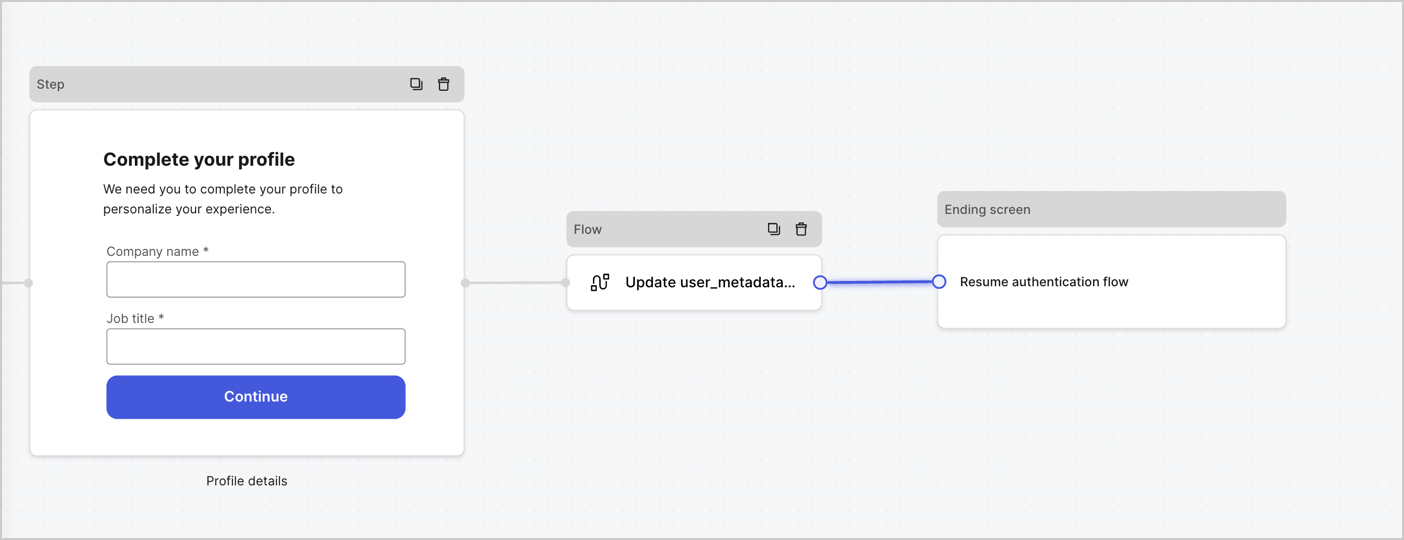
4. Link the **Flow** node to the **Step** and **Ending Screen** nodes as pictured below.
5. Select **Publish** to save.
<Frame>
  <img src="https://mintcdn.com/docs-staging-fix-xaa-resource-app-isv-updates/IT7JGxjgDJfgzi_q/docs/images/cdy7uua7fh8z/5C91DaWn4LGtJT9BF87ssu/095171d0c452a287c44bfde12fd6d13f/link-nodes.png?fit=max&auto=format&n=IT7JGxjgDJfgzi_q&q=85&s=2b4b7ef44ec68de3a17157c87a613b28" alt="Dashboard > Actions > Forms > Form" data-og-width="1404" width="1404" data-og-height="540" height="540" data-path="docs/images/cdy7uua7fh8z/5C91DaWn4LGtJT9BF87ssu/095171d0c452a287c44bfde12fd6d13f/link-nodes.png" data-optimize="true" data-opv="3" srcset="https://mintcdn.com/docs-staging-fix-xaa-resource-app-isv-updates/IT7JGxjgDJfgzi_q/docs/images/cdy7uua7fh8z/5C91DaWn4LGtJT9BF87ssu/095171d0c452a287c44bfde12fd6d13f/link-nodes.png?w=280&fit=max&auto=format&n=IT7JGxjgDJfgzi_q&q=85&s=b16b1453c61a17ca849c09f98737d31f 280w, https://mintcdn.com/docs-staging-fix-xaa-resource-app-isv-updates/IT7JGxjgDJfgzi_q/docs/images/cdy7uua7fh8z/5C91DaWn4LGtJT9BF87ssu/095171d0c452a287c44bfde12fd6d13f/link-nodes.png?w=560&fit=max&auto=format&n=IT7JGxjgDJfgzi_q&q=85&s=22530eca07fc07204fc3b26e2170cdf2 560w, https://mintcdn.com/docs-staging-fix-xaa-resource-app-isv-updates/IT7JGxjgDJfgzi_q/docs/images/cdy7uua7fh8z/5C91DaWn4LGtJT9BF87ssu/095171d0c452a287c44bfde12fd6d13f/link-nodes.png?w=840&fit=max&auto=format&n=IT7JGxjgDJfgzi_q&q=85&s=c487d98896766511d10948d2072eb749 840w, https://mintcdn.com/docs-staging-fix-xaa-resource-app-isv-updates/IT7JGxjgDJfgzi_q/docs/images/cdy7uua7fh8z/5C91DaWn4LGtJT9BF87ssu/095171d0c452a287c44bfde12fd6d13f/link-nodes.png?w=1100&fit=max&auto=format&n=IT7JGxjgDJfgzi_q&q=85&s=638843772c6251e4acf3b41c9ea3bffa 1100w, https://mintcdn.com/docs-staging-fix-xaa-resource-app-isv-updates/IT7JGxjgDJfgzi_q/docs/images/cdy7uua7fh8z/5C91DaWn4LGtJT9BF87ssu/095171d0c452a287c44bfde12fd6d13f/link-nodes.png?w=1650&fit=max&auto=format&n=IT7JGxjgDJfgzi_q&q=85&s=cd039825af0a0f76f79c0f371a1e62ed 1650w, https://mintcdn.com/docs-staging-fix-xaa-resource-app-isv-updates/IT7JGxjgDJfgzi_q/docs/images/cdy7uua7fh8z/5C91DaWn4LGtJT9BF87ssu/095171d0c452a287c44bfde12fd6d13f/link-nodes.png?w=2500&fit=max&auto=format&n=IT7JGxjgDJfgzi_q&q=85&s=66bb95fc8d44d550dd00a0ef43776535 2500w" />
</Frame>

Add an Auth0 Update user action to the flow by following these steps:

1. Select the **Update user\_metadata** flow, then select the **Edit Flow** to open the Flow editor in a new tab.
2. Below the **Start** action, select the **+** icon to add an **Update user** action. Complete the fields below, then select **Save** to continue.

   * **Connection**: Select from the dropdown the Vault connection to your M2M application.

   * **User ID**: Enter `{{context.user.user_id}}`.

   * **Body**: Copy and paste the following code to update the user\_metadata with `job_title` and `company_name` properties.

     ```json lines theme={null}
     {
        "user_metadata": {
           "job_title": "{{fields.job_title}}",
           "company_name": "{{fields.company_name}}"
        }
     }
     ```

   * Select **Save**.
3. Select **Publish** to save.

<Frame>
  <img src="https://mintcdn.com/docs-staging-fix-xaa-resource-app-isv-updates/lDicFJ4xcWj240f-/docs/images/cdy7uua7fh8z/65Jx4W5oIZJyyvA8z4HqIx/0661b1a8ca6361c54fc4fef07ba59f0b/update-user.png?fit=max&auto=format&n=lDicFJ4xcWj240f-&q=85&s=29b1bf64c9c2c648b0d389a2d36fd201" alt="Dashboard > Actions > Forms > Flows" data-og-width="1404" width="1404" data-og-height="244" height="244" data-path="docs/images/cdy7uua7fh8z/65Jx4W5oIZJyyvA8z4HqIx/0661b1a8ca6361c54fc4fef07ba59f0b/update-user.png" data-optimize="true" data-opv="3" srcset="https://mintcdn.com/docs-staging-fix-xaa-resource-app-isv-updates/lDicFJ4xcWj240f-/docs/images/cdy7uua7fh8z/65Jx4W5oIZJyyvA8z4HqIx/0661b1a8ca6361c54fc4fef07ba59f0b/update-user.png?w=280&fit=max&auto=format&n=lDicFJ4xcWj240f-&q=85&s=b4873f28432ce6676cacb1b9e8a0cae6 280w, https://mintcdn.com/docs-staging-fix-xaa-resource-app-isv-updates/lDicFJ4xcWj240f-/docs/images/cdy7uua7fh8z/65Jx4W5oIZJyyvA8z4HqIx/0661b1a8ca6361c54fc4fef07ba59f0b/update-user.png?w=560&fit=max&auto=format&n=lDicFJ4xcWj240f-&q=85&s=5025cbd92e6fde12c4e34245e5e34e11 560w, https://mintcdn.com/docs-staging-fix-xaa-resource-app-isv-updates/lDicFJ4xcWj240f-/docs/images/cdy7uua7fh8z/65Jx4W5oIZJyyvA8z4HqIx/0661b1a8ca6361c54fc4fef07ba59f0b/update-user.png?w=840&fit=max&auto=format&n=lDicFJ4xcWj240f-&q=85&s=93ee53f56908a5daf8b62ac7921a7626 840w, https://mintcdn.com/docs-staging-fix-xaa-resource-app-isv-updates/lDicFJ4xcWj240f-/docs/images/cdy7uua7fh8z/65Jx4W5oIZJyyvA8z4HqIx/0661b1a8ca6361c54fc4fef07ba59f0b/update-user.png?w=1100&fit=max&auto=format&n=lDicFJ4xcWj240f-&q=85&s=e9194c296369c8ea845a32e8096d506d 1100w, https://mintcdn.com/docs-staging-fix-xaa-resource-app-isv-updates/lDicFJ4xcWj240f-/docs/images/cdy7uua7fh8z/65Jx4W5oIZJyyvA8z4HqIx/0661b1a8ca6361c54fc4fef07ba59f0b/update-user.png?w=1650&fit=max&auto=format&n=lDicFJ4xcWj240f-&q=85&s=bd8ccf61b4421bcb69e6d87a9b5e9308 1650w, https://mintcdn.com/docs-staging-fix-xaa-resource-app-isv-updates/lDicFJ4xcWj240f-/docs/images/cdy7uua7fh8z/65Jx4W5oIZJyyvA8z4HqIx/0661b1a8ca6361c54fc4fef07ba59f0b/update-user.png?w=2500&fit=max&auto=format&n=lDicFJ4xcWj240f-&q=85&s=6c0ba039efbe935d4be7834f0d66182b 2500w" />
</Frame>

### Retrieve the form render code

Retrieve the form render code to visually render the form with a custom Post Login Action by following these steps:

* From the Form editor, select **`<> Render`**.
* Select **Copy**.
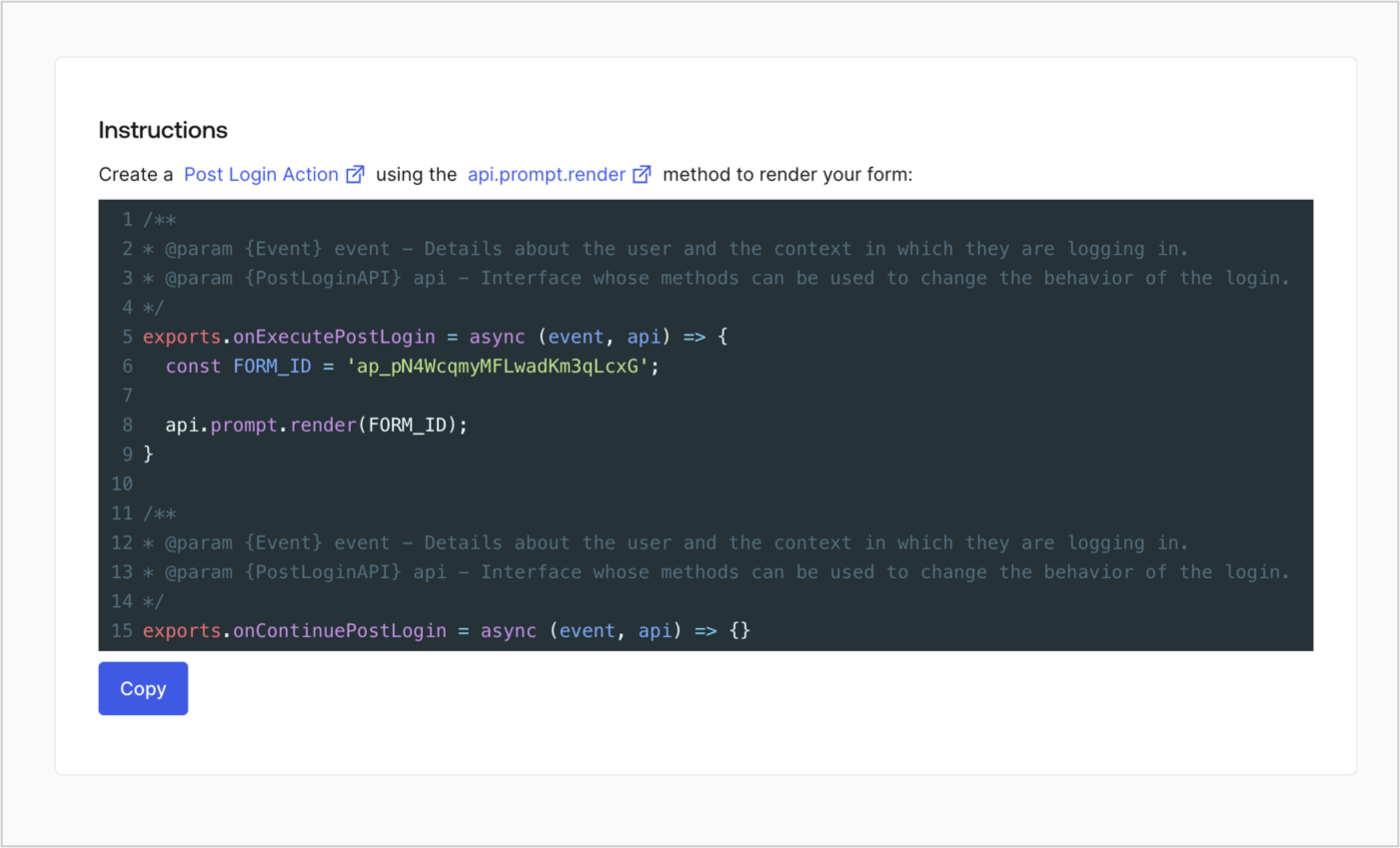
<Frame>
  <img src="https://mintcdn.com/docs-staging-fix-xaa-resource-app-isv-updates/7Hf53Gd1CsKOHIc5/docs/images/cdy7uua7fh8z/2EIUzc539sq9lwoTKbjoJv/496a864c0fc44a782c9cadca119dbfb0/embed.png?fit=max&auto=format&n=7Hf53Gd1CsKOHIc5&q=85&s=c25e4811fd05f0693adca9ff263f30f1" alt="Dashboard > Actions > Forms > Form > Embed" data-og-width="1400" width="1400" data-og-height="848" height="848" data-path="docs/images/cdy7uua7fh8z/2EIUzc539sq9lwoTKbjoJv/496a864c0fc44a782c9cadca119dbfb0/embed.png" data-optimize="true" data-opv="3" srcset="https://mintcdn.com/docs-staging-fix-xaa-resource-app-isv-updates/7Hf53Gd1CsKOHIc5/docs/images/cdy7uua7fh8z/2EIUzc539sq9lwoTKbjoJv/496a864c0fc44a782c9cadca119dbfb0/embed.png?w=280&fit=max&auto=format&n=7Hf53Gd1CsKOHIc5&q=85&s=6f2bed958b3f8713c4d4c375a90ae3e4 280w, https://mintcdn.com/docs-staging-fix-xaa-resource-app-isv-updates/7Hf53Gd1CsKOHIc5/docs/images/cdy7uua7fh8z/2EIUzc539sq9lwoTKbjoJv/496a864c0fc44a782c9cadca119dbfb0/embed.png?w=560&fit=max&auto=format&n=7Hf53Gd1CsKOHIc5&q=85&s=aae51eed9f787979674fcefe9cc23e8e 560w, https://mintcdn.com/docs-staging-fix-xaa-resource-app-isv-updates/7Hf53Gd1CsKOHIc5/docs/images/cdy7uua7fh8z/2EIUzc539sq9lwoTKbjoJv/496a864c0fc44a782c9cadca119dbfb0/embed.png?w=840&fit=max&auto=format&n=7Hf53Gd1CsKOHIc5&q=85&s=37a974eaf6a56f3c23fac6edefb1ae22 840w, https://mintcdn.com/docs-staging-fix-xaa-resource-app-isv-updates/7Hf53Gd1CsKOHIc5/docs/images/cdy7uua7fh8z/2EIUzc539sq9lwoTKbjoJv/496a864c0fc44a782c9cadca119dbfb0/embed.png?w=1100&fit=max&auto=format&n=7Hf53Gd1CsKOHIc5&q=85&s=36c18239328468ef49aef5e227053a5c 1100w, https://mintcdn.com/docs-staging-fix-xaa-resource-app-isv-updates/7Hf53Gd1CsKOHIc5/docs/images/cdy7uua7fh8z/2EIUzc539sq9lwoTKbjoJv/496a864c0fc44a782c9cadca119dbfb0/embed.png?w=1650&fit=max&auto=format&n=7Hf53Gd1CsKOHIc5&q=85&s=60c7e2114dbd078f7a08f40ab4e15339 1650w, https://mintcdn.com/docs-staging-fix-xaa-resource-app-isv-updates/7Hf53Gd1CsKOHIc5/docs/images/cdy7uua7fh8z/2EIUzc539sq9lwoTKbjoJv/496a864c0fc44a782c9cadca119dbfb0/embed.png?w=2500&fit=max&auto=format&n=7Hf53Gd1CsKOHIc5&q=85&s=b90ddbb88fd8726fc7c1830281f06996 2500w" />
</Frame>

## Create a Post Login Action

Create a post-login Action to render your form by following these steps:

1. Navigate to **Auth0 Dashboard > Actions > Flows > Login.**
2. Select the **+** icon and select **Build from scratch**:

   * **Name**: Enter `Render Progressive Profile Form`.
   * **Trigger**: Select `Login / Post Login`.
   * **Runtime**: Select the recommended version.
3. Select **Create**.

To configure the post-login Action:

1. Delete the existing code from the Code editor.
2. Paste the form embed code into the Code editor.
3. Edit the code to define the conditional logic that will render the form.

   ```javascript lines theme={null}
   /**
   * @param {Event} event - Details about the user and the context in which they are logging in.
   * @param {PostLoginAPI} api - Interface whose methods can be used to change the behavior of the login.
   */
   exports.onExecutePostLogin = async (event, api) => {
     const FORM_ID = 'REPLACE_WITH_YOUR_FORM_ID';

     if (
       event.stats.logins_count > 2 &&
       !event.user.user_metadata.company_name &&
       !event.user.user_metadata.job_title
     ) {
       api.prompt.render(FORM_ID);
     }
   }

   exports.onContinuePostLogin = async (event, api) => { }
   ```

   <Callout icon="file-lines" color="#0EA5E9" iconType="regular">
     The example code above will render the form when a user has a login count > 2 and is missing the user metadata company\_name and job\_title properties.
   </Callout>
4. Select **Deploy.**
5. Drag and Drop the **Render Progressive Profile Form** Action to the **Login** flow.
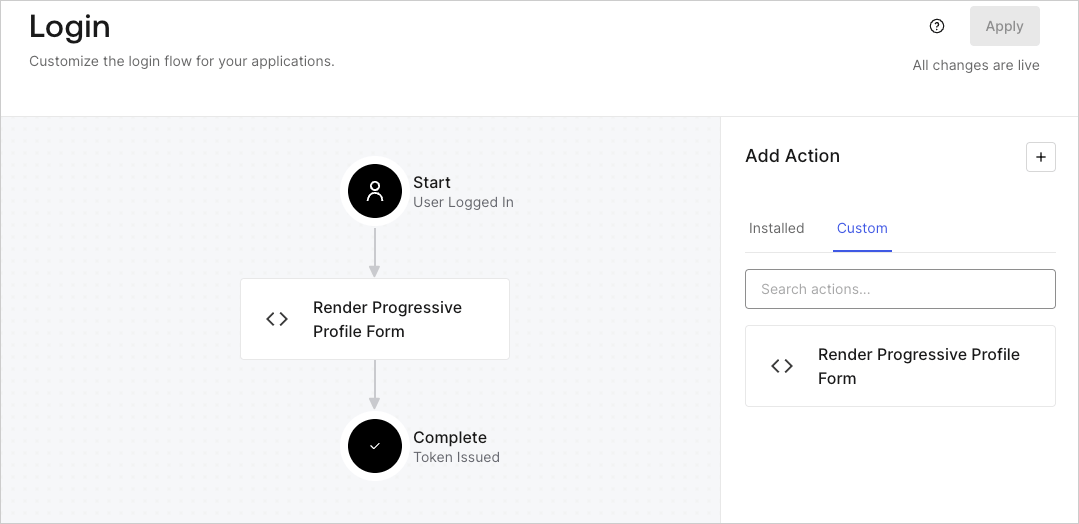
   <Frame>
     <img src="https://mintcdn.com/docs-staging-fix-xaa-resource-app-isv-updates/VtXDk2vk9aKxFOMi/docs/images/cdy7uua7fh8z/1QjjZdpTqTxx012UDN4xk9/99fba5ef4068a5688f1762eea7f42976/renderprogessiveprofile.png?fit=max&auto=format&n=VtXDk2vk9aKxFOMi&q=85&s=c308f828f5b8b11b6ba7ba34c6f832e0" alt="Dashboard > Forms > Use Cases Progressive Profile Login Action" data-og-width="1079" width="1079" data-og-height="524" height="524" data-path="docs/images/cdy7uua7fh8z/1QjjZdpTqTxx012UDN4xk9/99fba5ef4068a5688f1762eea7f42976/renderprogessiveprofile.png" data-optimize="true" data-opv="3" srcset="https://mintcdn.com/docs-staging-fix-xaa-resource-app-isv-updates/VtXDk2vk9aKxFOMi/docs/images/cdy7uua7fh8z/1QjjZdpTqTxx012UDN4xk9/99fba5ef4068a5688f1762eea7f42976/renderprogessiveprofile.png?w=280&fit=max&auto=format&n=VtXDk2vk9aKxFOMi&q=85&s=f4e1007728dac862a494116c7212a2e4 280w, https://mintcdn.com/docs-staging-fix-xaa-resource-app-isv-updates/VtXDk2vk9aKxFOMi/docs/images/cdy7uua7fh8z/1QjjZdpTqTxx012UDN4xk9/99fba5ef4068a5688f1762eea7f42976/renderprogessiveprofile.png?w=560&fit=max&auto=format&n=VtXDk2vk9aKxFOMi&q=85&s=79d5cc7bcd52749ab17f69c05f8c6967 560w, https://mintcdn.com/docs-staging-fix-xaa-resource-app-isv-updates/VtXDk2vk9aKxFOMi/docs/images/cdy7uua7fh8z/1QjjZdpTqTxx012UDN4xk9/99fba5ef4068a5688f1762eea7f42976/renderprogessiveprofile.png?w=840&fit=max&auto=format&n=VtXDk2vk9aKxFOMi&q=85&s=1dedc43a187b5d9138532d9f6f04efce 840w, https://mintcdn.com/docs-staging-fix-xaa-resource-app-isv-updates/VtXDk2vk9aKxFOMi/docs/images/cdy7uua7fh8z/1QjjZdpTqTxx012UDN4xk9/99fba5ef4068a5688f1762eea7f42976/renderprogessiveprofile.png?w=1100&fit=max&auto=format&n=VtXDk2vk9aKxFOMi&q=85&s=fb6eecade58296b27111ef6c0187949f 1100w, https://mintcdn.com/docs-staging-fix-xaa-resource-app-isv-updates/VtXDk2vk9aKxFOMi/docs/images/cdy7uua7fh8z/1QjjZdpTqTxx012UDN4xk9/99fba5ef4068a5688f1762eea7f42976/renderprogessiveprofile.png?w=1650&fit=max&auto=format&n=VtXDk2vk9aKxFOMi&q=85&s=62af99a1bf3133f5b4c8f3637663b54c 1650w, https://mintcdn.com/docs-staging-fix-xaa-resource-app-isv-updates/VtXDk2vk9aKxFOMi/docs/images/cdy7uua7fh8z/1QjjZdpTqTxx012UDN4xk9/99fba5ef4068a5688f1762eea7f42976/renderprogessiveprofile.png?w=2500&fit=max&auto=format&n=VtXDk2vk9aKxFOMi&q=85&s=538433d59c1e346e883323ed00a9f9d0 2500w" />
   </Frame>
6. Select **Apply**.

### Test implementation

Test the implementation by following these steps:

1. Log in with an existing user whose login count is greater than 2 and their `user_metadata` attributes `company_name` and `job_title` have no values.
2. The post-login action in the Login flow will render the form and prompt for the information.
3. Select **Auth0 Dashboard > User Management > Users,** locate the user and verify that the `user_metadata` attributes `company_name` and `job_title` contain information.
